Home Lab / May 2026
My Home Assistant Is the Control Room for My House
How I use Home Assistant to bring heating, energy, networking, cameras, appliances, family routines, and weather into one shared operational view.
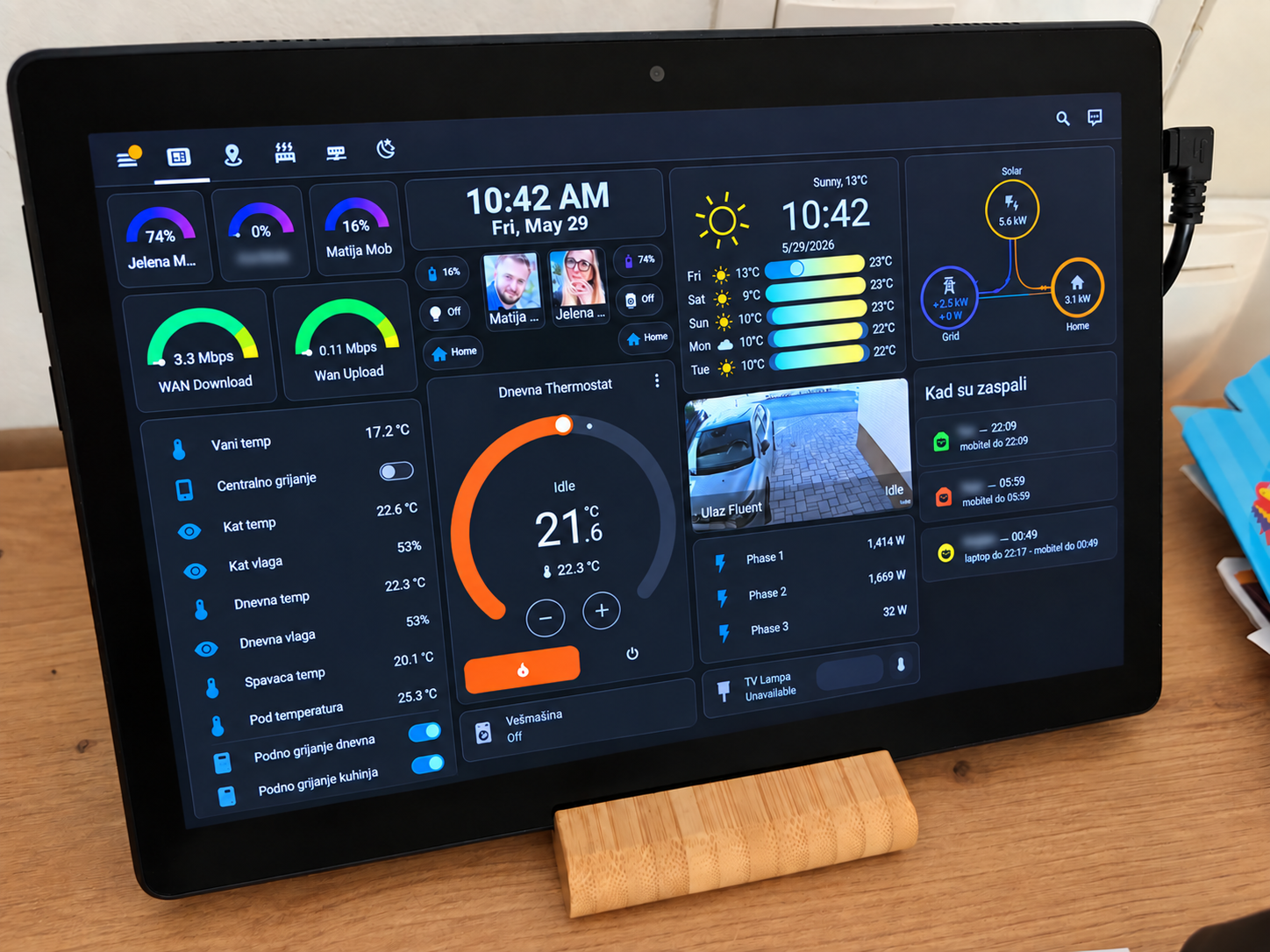
I did not build my Home Assistant setup because I wanted a house full of “smart” gadgets.
I built it because I wanted to know what was happening.
Is the heating running?
How warm and humid is the house?
Is the washing machine still working?
How much power is the house using right now?
How much of that is coming from solar?
Is somebody at the front door?
Are the kids still online long after they should probably be asleep?
And if we are away for a few days in winter, can I turn the heating on before we get home?
Over time, Home Assistant became the place where all of those questions meet.
It is less a smart-home dashboard and more a small operations console for the house.
The center of it is a wall-mounted Android tablet in the living room. Everybody uses it. One glance shows the things we actually care about: temperature, humidity, heating, WAN traffic, weather, solar production, grid flow, camera view, washing-machine status, who is home, and a few bits of family state that would otherwise require opening several different apps.
That is the part I like most.
The house does not feel “automated.”
It feels observable.
One screen instead of ten apps
Most home technology arrives as an island.
The inverter has its app.
The air conditioner has another.
The camera has another.
The router and firewall have their own interfaces.
Zigbee devices speak their own protocol.
The washing machine is just a washing machine.
Weather comes from somewhere else.
Home Assistant gives me one place to turn all of that into a common model.
The main dashboard includes phone presence and battery status, live WAN download and upload rates, indoor and outdoor temperatures, humidity, central heating, a live camera view, three-phase power consumption, solar generation, grid import/export, and weather. The same interface also shows whether the washing machine is running and some family-specific information such as when the kids appeared to stop using their devices the previous night.
The value is not that every device is controllable.
The value is that the information is in the same place.
Heating is where automation becomes useful
Heating is one of the clearest examples of where the system earns its keep.
In winter, the living-room thermostat runs on different day and night targets. Home Assistant calculates which target should currently be active and applies it to the thermostat.
There are also guardrails.
If the living room gets too warm while the central heating is on, Home Assistant shuts it down and sends me a notification.
The floor heating has its own temperature protection. If the floor temperature exceeds the safety threshold, the relevant heating circuits are switched off.
That is much more useful to me than simply having a remote thermostat.
And when we travel, being able to see the actual house temperature and turn the heating on before we return is one of those features that feels completely normal once you have it.
Summer works the same way in the other direction.
The air conditioners are integrated too, so cooling can be automated based on temperature and schedule instead of waiting for someone to notice that the house has become uncomfortable.
I also keep an eye on humidity.
Temperature gets all the attention in smart-home discussions, but humidity tells you a lot about whether the house actually feels comfortable and whether ventilation is doing what you expect.
The washing machine became smart without replacing it
One of my favorite automations involves a completely ordinary washing machine.
I did not replace it with a Wi-Fi model.
I measure its power consumption.
When consumption stays above 50 W for ten seconds, Home Assistant marks the machine as running.
When consumption drops below 2 W for several minutes, after the machine has been running long enough to avoid false triggers, it marks the cycle as finished and sends a notification:
Take the laundry out.
That is it.
No cloud API.
No vendor integration.
No special appliance.
Just a useful state derived from electricity consumption.
This is the pattern I keep coming back to:
A sensor tells me what happened. The useful part is deciding what that means.
Solar is more useful when you can see the whole house
The same idea applies to energy.
I have solar production data from the inverter and grid measurements from the power meter, but neither one alone tells me what the house is actually consuming.
So Home Assistant derives it.
Current house load is calculated from inverter production and grid power rather than relying on a separate “house consumption” sensor. I also derive per-phase consumption using inverter current distribution and phase-level grid measurements.
The result is a simple power-flow view on the living-room tablet:
solar ↔ grid ↔ home
At a glance I can see whether we are importing power, exporting it, how much solar is producing, and roughly what the house is consuming.
I do not need this information every minute.
That is the point of the dashboard.
When I care, it is already there.
The network is part of the house
Because my background is networking, the network naturally ended up as another household subsystem.
WAN throughput is pulled from the router with SNMP counters, converted into rates, and displayed directly in Home Assistant.
OPNsense handles the firewall side.
If I enable an internet block for one of the kids' devices, I also explicitly kill the existing firewall states. Otherwise, an already-established connection can continue working even though the firewall rule has changed.
That is a small detail, but it is the kind of detail that separates “the configuration changed” from “the behavior actually changed.”
For historical traffic and analysis I use ntopng and InfluxDB, with Grafana where a time-series view makes more sense than a Home Assistant card.
Home Assistant is therefore not replacing those systems.
It is the integration layer that makes the useful parts visible to the household.
Checking whether the kids are still awake
This is probably the most unusual part of the setup.
I wanted a simple way to answer a practical parenting question:
Are they actually asleep, or are they still using their laptop or phone at 01:00?
The first version was easy.
Look at network activity.
That turned out to be wrong.
An idle phone still wakes up periodically. Apps refresh. Background services download things. A single network spike can make a device look “active” even when nobody has touched it for an hour.
So the logic evolved.
For the nightly calculation, I look at the previous evening and night, from 20:00 to 06:00. Network activity is converted into per-minute received-data rates. Nearby active minutes are grouped into runs, but a run only counts as real usage if it is sustained: enough active minutes, enough density, and enough average traffic. That filters out the small periodic bursts generated by an idle phone.
Then I hit the opposite problem.
Some real phone use is surprisingly low bandwidth.
Chatting, scrolling Instagram, or light YouTube use may not produce enough sustained traffic to cross the threshold.
So I added a second signal: DNS activity from OPNsense/Unbound.
An actively used device tends to generate significantly more public DNS lookups than an idle one. The bedtime calculation evaluates both signals and uses the later credible activity time.
There was one more problem: device identity.
Phones randomize Wi-Fi MAC addresses.
Hard-code the MAC and eventually your beautiful monitoring system quietly starts attributing nothing to the device.
So the scripts resolve the current devices through UniFi and can merge activity across multiple MAC addresses associated with the same device.
The output is intentionally simple.
On the tablet I see something like:
Child 1 — 22:09
Child 2 — laptop until 22:17 → phone until 00:49
I can also see whether somebody appears awake right now.
The live calculation looks only at the last few minutes and requires sustained activity rather than one spike. It checks both traffic and DNS, then exposes a simple state back to Home Assistant: awake or asleep.
The technical stack underneath that small card is much larger than the card itself:
UniFi → ntopng / OPNsense → InfluxDB → Python → Home Assistant → Grafana
But nobody in the living room needs to care.
They just see the answer.
That is exactly how I want infrastructure to work.
Zigbee still needs to behave like a light switch
Not everything needs to be clever.
Some things just need to work naturally.
The bedroom has a Zigbee remote connected through ZHA.
Short press turns the light on or off.
Holding the dimmer button continuously changes brightness until the button is released.
That required a little more event handling than simply binding a button to a light, but the result behaves like a normal physical dimmer.
That is important to me.
A smart home that requires everybody to learn the smart home is a bad smart home.
The tablet is useful because it is there when somebody wants it.
The wall switch still has to work.
Cameras should answer a question
The front camera is another example.
I do not need to watch the camera all day.
If person detection triggers, Home Assistant takes a snapshot and sends it to my phone.
The notification answers the useful question:
Who is at the entrance?
Again, the automation is small.
The important part is connecting detection, image capture, and the device I am actually carrying.
The tablet is the product
I have plenty of backend infrastructure behind all of this.
Home Assistant.
OPNsense.
UniFi.
ntopng.
InfluxDB.
Grafana.
Zigbee/ZHA.
Python scripts.
SNMP.
Solar and power-meter integrations.
Cameras.
Android devices.
But the finished product is not the architecture diagram.
It is the tablet sitting in the living room.
Everybody can walk past it and understand the house in a few seconds.
What is the weather?
Is the heating on?
What temperature is it upstairs?
Is the washing machine finished?
How much solar are we making?
Who is home?
Is somebody at the door?
Did the kids stay online too late?
The infrastructure disappears behind useful state.
That is probably the same reason I enjoy building systems professionally.
I like taking many components that each know one small part of reality and turning them into something that answers a useful question.
Automation is not the goal
It is easy to automate too much.
I do not want the house constantly making clever decisions just because it can.
Some things should be automatic.
Heating schedules are a good example.
Safety cutoffs are obvious.
A finished washing-machine notification is useful.
Automatic cooling can make sense.
Other things are better as information.
Solar production.
Current power use.
Humidity.
WAN traffic.
Weather.
Where family phones currently appear to be.
The goal is not maximum automation.
The goal is having the right combination of visibility, control, and automation.
Home Assistant happens to be a very good place to bring those three together.
And after years of adding one useful thing at a time, that little Android tablet has become something I use every day.
Not because my house is especially smart.
Because I can see what it is doing.